
Start with a job you already do badly, repeatedly, and on purpose — not with a tool. The question is never which AI should we buy. It is which of the things we already do every week is a language model actually good at. There are about four of those, the model time costs pennies, and the expensive part is the part nobody mentions.
If you run a business with twenty or fifty people and you have not done anything with AI yet, you are not behind. You are in a majority that the loudest numbers in this field work hard to hide.
Where you actually are
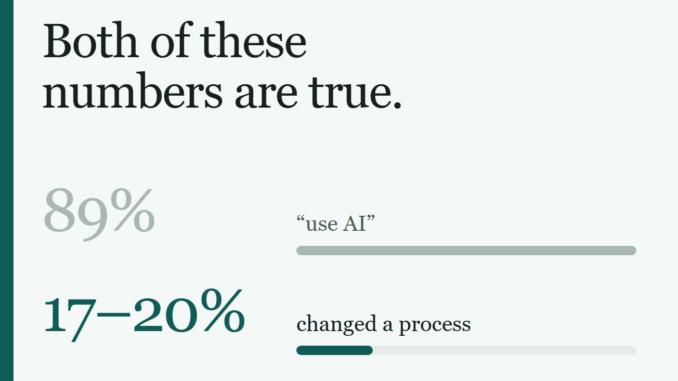
Two sets of figures are circulating and they do not agree. The US Chamber of Commerce reports that 89% of small businesses use AI in some capacity. Census-based measures that ask about production operations put it nearer 17 to 20%, and some read lower still.
Both are true, because they are measuring different things. The high number counts somebody on your team pasting a paragraph into a chatbot. The low number counts a business process that actually changed. The gap between those two is the entire subject of this article.
The other figures are more useful, and they are consistent. Among small businesses not using AI, 77% say they cannot see a use case for their business. 62% cite not understanding the benefits, 60% the lack of anyone in-house who could do it. In Goldman Sachs and Babson’s 2026 survey of 1,256 small businesses, 73% said they would benefit from more access to training and implementation help. Only 23% of small businesses already using AI tools have had any formal training on them.
The barrier is not cost, and it is not the technology. It is that nobody has connected the tool to a job you recognise. Three out of four non-adopters cannot see the use case — and most of the published advice is written by people selling the tool, for an audience of engineers.
The four jobs it is reliably good at
Strip away the demos and a language model does a small number of things dependably. All four have the same shape: text in, text out, with a human able to check the result.
- Turning messy input into structured data. Invoices, forms, emails, PDFs, inconsistent spreadsheet columns — in, and clean fields out.
- Answering questions from documents you already have. Your policies, your product details, your past quotes.
- Producing a first draft. Never a final one.
- Summarising and classifying at volume. Four thousand rows, every support ticket last quarter, a hundred-page contract.
And the thing it is not: a decision-maker. It does not forecast, it does not judge, and it cannot be accountable. Ask it which of two suppliers to use and it will give you a fluent, confident answer with nothing behind it. That failure mode is the dangerous one precisely because the output looks identical to the useful kind.
Pick the job you were already thinking of
Six jobs small businesses most often ask me about. One of them is a no.
Answering the same customer questions over and over
- What it does
- Answers from your documents — your policies, hours, returns process, product details — rather than from general knowledge. The documents go in the prompt, not into training.
- Model cost
- About 16 cents per thousand answers on a small model with the reference documents cached.
- What breaks
- It answers questions your documents do not cover, confidently. The fix is a refusal instruction and a route to a human, tested on the awkward questions before launch, not after.
- First step
- Collect the fifty questions you actually get. If you cannot write the correct answer to all fifty yourself, the project is a documentation project first.
Pulling data out of invoices, forms and PDFs
- What it does
- Reads an unstructured document and returns the fields you asked for, in a fixed shape you can load straight into a spreadsheet or a system.
- Model cost
- Roughly 30 cents per thousand text-layer invoices on a small model. Scanned images cost several times more, because a page of pixels is far more tokens than a page of text.
- What breaks
- Quietly, on the unusual document. Build the exception path on day one: anything the model is not sure about goes to a person, rather than into your ledger.
- First step
- Take thirty real documents, including your three ugliest. Thirty is enough to know whether this works.
Writing first drafts
- What it does
- Gets you to a 70% draft of a listing, a description, a routine reply, a job advert. It does not get you to publishable.
- Model cost
- About one dollar per hundred product-description drafts on a mid-tier model.
- What breaks
- Not the cost — the editing. If your people are not already good writers in your voice, they cannot tell a good draft from a plausible one, and the time saving disappears into revisions. Published unedited, it reads exactly like what it is.
- First step
- Give it five pieces you are proud of and ask for a sixth. Judge that, not a blank-slate demo.
Summarising long documents and meeting notes
- What it does
- Turns something nobody will read into something somebody will — and, more usefully, answers specific questions against it.
- Model cost
- Around 5 cents per document for a long one, on a mid-tier model.
- What breaks
- Summaries drop the thing you personally needed. Ask for answers to named questions rather than a general summary, and you get a far better result for the same money.
- First step
- Use it on a document you have already read closely. That is the only way to see what it missed.
Cleaning and categorising a messy spreadsheet
- What it does
- Standardises inconsistent names, fills a category column, flags duplicates that are not exact matches — the work that otherwise eats somebody’s Friday.
- Model cost
- Under 5 cents for a four-thousand-row sheet, and half that if you can wait and send it as a batch job.
- What breaks
- Nothing visible, which is the problem. It will categorise rows it should have queried. Have it output a confidence or a reason per row and spot-check the low end.
- First step
- Run it on a copy, and diff the result against the original. Never let it write back to the only copy.
Deciding something, or forecasting numbers
- What people ask for
- Which supplier to choose. Next quarter’s demand. Which customers will churn. Whether to take the contract.
- Why not
- A language model predicts plausible text, not outcomes. Ask for a number and you get a number — fluent, specific, and unconnected to your data. There is no error bar, and no way to tell a grounded answer from an invented one by looking at it.
- What to do instead
- Use it for the step before the decision: assemble the data, pull the comparable cases out of your records, draft the options. Then a person decides, with the numbers in front of them.
- The honest version
- Forecasting from your own history is a real discipline with real methods. It is not this one, and dressing it up as AI is how businesses end up confidently wrong.
Model costs are computed from published Claude list prices as of October 2026 — $0.10 and $0.50 per million input and output tokens on the small model, $2.00 and $10.00 on the mid-tier, with cached reference documents read back at a tenth of the input price. They cover model time only. See the section below for the costs that actually dominate.
What it costs, honestly
Those numbers are real, and they are also the least important numbers on this page. Model time is the cheap part of an AI project — often by two orders of magnitude. Here is where the money goes on a first project that reaches production:
| Cost | Rough share | Why |
|---|---|---|
| Model time | 1 to 5% | Pennies per thousand operations, as above |
| Connecting it to where your data already is | 30 to 40% | Your data lives in a system with no good export. This is the real project, and it is the one nobody demos. |
| Checking that it is right | 25 to 35% | Building the set of known-correct answers you test against. Skip this and you have a demo, not a process. |
| The exception path | 15 to 25% | What happens to the 4% it cannot handle. Without it, the 4% silently becomes wrong data. |
| Training the people using it | 10 to 15% | The thing 73% of small businesses say they want and 23% have had |
A demo works on five examples, somebody approves a rollout, and the checking and exception work never gets funded — because the demo made the job look finished. Six weeks later the output is 95% right, nobody knows which 5%, and trust is gone.
Budget for the checking before the building. It is not overhead; it is the thing that makes the output usable.
Four tests for telling a real use case from a demo
Run any proposal — yours, a vendor’s, mine — through these before spending anything.
- Does it already happen? If the task is not already being done by someone, repeatedly, you are inventing work. Automate the Friday afternoon job, not a hypothetical one.
- Can you tell, in under a minute, whether an answer is right? If checking the output takes as long as producing it, there is no saving. This single test eliminates most bad AI projects.
- What happens when it is wrong? Wrong draft, somebody edits it. Wrong number in your accounts, you find out in an audit. Only the first class is a good first project.
- Does it run on data you can actually get at? Not data that exists — data you can export today without a vendor’s permission. This is where most small-business AI projects quietly die.
Which tools do you actually need
Three tiers, and almost everyone should start at the first one. Organise this by the job, never by the vendor — the vendors change every few weeks and the jobs do not.
Tier 1 — A chat subscription, per person. Start here.
Twenty to thirty dollars a month per person for Claude, ChatGPT or Gemini. Your people paste work in and get work out. No integration, no engineering, cancel any time.
This is the right answer for drafting, summarising and ad-hoc analysis — which is most of what a twenty-person business needs. If a chat subscription and two hours of training would solve your problem, buy that and stop reading. Most of the 89% adoption figure is this tier, and there is nothing wrong with being in it.
The ceiling is that nothing is repeatable. Every run depends on a person remembering to do it a particular way.
Tier 2 — Connectors into the tools you already use
The assistant reads and writes your documents, spreadsheets and records directly. Over the last few weeks this tier has moved quickly — Google Workspace connectors for documents, sheets and slides arrived in October 2026, and dashboards that connect to data platforms and business systems went into beta days later.
This is where a small business gets repeatability without hiring an engineer, and it is the tier I would watch most closely in 2027. The caution is that connectors are only as good as the tidiness of what they connect to: pointed at a messy shared drive, you get confident answers from the wrong version of the file.
Tier 3 — Something built on the API
Only worth it when the job runs hundreds or thousands of times, has a fixed shape, and needs to happen without anyone remembering to start it. Document extraction at volume, classifying every incoming ticket, enriching a record as it arrives.
This is where the pennies-per-thousand economics apply — and where the costs in the table above are real. It is a project, not a purchase.
What does not belong here: anything a tier 1 subscription already handles. Building a custom tool to do what a $25 subscription does is the most expensive mistake available in this field.
Your first two weeks
- Days 1–2. Write down every recurring task where someone retypes, copies, reformats or re-reads something. Do not filter yet. Aim for fifteen.
- Days 3–4. Run the four tests above over the list. Most will fail. Keep the two or three that survive.
- Day 5. Buy one chat subscription. One, for the person who does the most of that task.
- Week 2. Have that person do the task both ways for a week — their way and with the tool — and keep a tally: time taken, how often the output needed fixing, how bad the worst output was. That tally is worth more than any vendor’s case study, because it is about your work.
At the end of two weeks you have spent about thirty dollars and you know something specific and true about your own business. That is a better position than almost anyone selling you a transformation programme will put you in.
What I would tell you not to do
- Do not start with a strategy. You cannot write an AI strategy before you know which of your jobs this works on, and you learn that in two weeks for thirty dollars.
- Do not buy a platform first. Platform decisions made before you have one working use case are decisions made with no information.
- Do not start with your most important process. Start with the most annoying one. The cost of being wrong is a wasted afternoon instead of a wrong invoice.
- Do not let the pilot skip the checking. See the warning above. This is the one that actually kills projects.
- Do not worry yet about which model is best. At tier 1 the differences will not decide anything for you, and they change monthly. The job is the decision; the model is a detail.
Pick one annoying, repetitive, text-shaped job where you can check the answer in a minute and being wrong costs you nothing. Spend thirty dollars. Keep a tally for a week. Then decide.
Everything else in this field — the models, the tiers, the vendors, the agents — is a detail you can afford to learn later, after that one job is working.
I fix expensive data problems for small and mid-sized businesses, and most of that work starts exactly where this article ends: a job that happens every week, a data source nobody can export from, and no one in-house to join the two. If you have a job in mind and want a straight answer on whether it is worth doing, tell me what it is, or see how I work.